What is Magic Bookmark, and who is it for?
By the Best Reading Apps editors · Published 3 November 2026 · Checked 3 November 2026 · Desk research
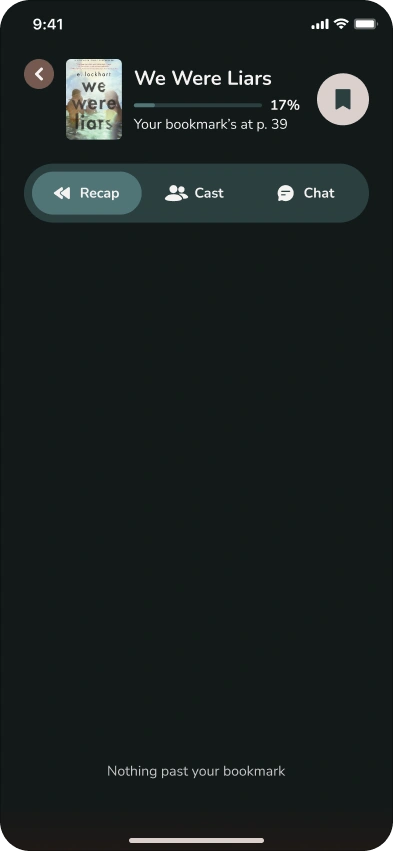
Magic Bookmark is an iPhone reading companion from Yomu Inc. that picks up exactly where you are in a book you already have. Snap the page you are on, type the page number, or for an audiobook enter the last phrase you heard, and it gives you a recap, a cast list and answers that stop at that point, so nothing ahead of you is spoiled. It works with print, ebooks and audiobooks for its supported titles. Your first book is free; after that you pay per book, from $1.40 to $4.99, with no subscription.
What does Magic Bookmark do?
It solves one specific problem: coming back to a book and not remembering who is who or what just happened. Most reading apps either sell you the book, lend it, or log it. Magic Bookmark does none of those. It sits next to the copy you are already reading and tells you the story so far, up to your page and no further.
The App Store listing describes four things it does once it knows your place:
- A recap that stops exactly where you are, not at the end of the chapter or the end of the book.
- A cast list of who's who and how they are connected, built only from what you have read. New characters appear only once you have met them.
- Questions about the story so far, answered without spoilers, such as whether two characters have met yet.
- Chat with characters: type @ to summon one, and they answer in character, knowing the story only up to your page.
How does a page-locked recap work?
A page-locked recap is a summary with a hard stop. The app first works out where you are, then only draws on the part of the book before that point. That is the difference from asking a general chatbot: a chatbot does not know which page you are on, so you have to tell it and trust it not to mention later events.
Magic Bookmark finds your place in three ways, depending on the format:
- Print book: take a photo of the page you are on, or type the page number.
- Ebook: the same, from the screen of whatever ebook app you read in.
- Audiobook: type the last phrase you heard.
The listing says it syncs to your exact place, "not just the chapter". The bookmark then moves with you through the book, so the next time you open it you update your place and get a recap from there.
Which books and formats does it cover?
Formats first. The website calls the idea BYOB: bring, buy or borrow your own book. "Hardcover, paperback, audio book, ebook or library loan. However you read, your bookmark works." It does not contain the book itself, so you still need your own copy, from a shop, a store app or the library.
Audiobooks arrived in October 2026. The release notes for version 1.1 (21 October) and version 1.1.1 (27 October) read: "Now with audiobook support: get spoiler-free recaps for any book format."
Then titles. Magic Bookmark covers supported titles only. Its website says it launched with the romance, fantasy, romantasy, YA, sci-fi and historical fiction titles popular on BookTok and Bookstagram, is adding more over time, and lets you request a title in the app. Check that your book is supported before you rely on it.
How much does Magic Bookmark cost?
The app is a free download and your first Bookmark Credit is free. One credit covers one whole book: the bookmark moves with you through that book, so you do not spend a credit each time you open it. Credits never expire and there is no subscription.
| Pack | Price | Per book |
|---|---|---|
| First credit | Free | Free |
| 1 credit | $4.99 | $4.99 |
| 5 credits | $19.99 | $4.00 |
| 10 credits | $34.99 | $3.50 |
| 50 credits | $69.99 | $1.40 |
What devices does it run on?
iPhone, with iOS 16.4 or later. The App Store also lists Mac computers with Apple silicon, but the listing header says "Designed for iPhone. Not verified for macOS." There is no Android or web version yet; the website says Android is "on the roadmap for later". The app is in English and rated 13+.
Magic Bookmark vs Kindle's Story So Far
They solve the same problem in different places. Pick by format and device.
| Magic Bookmark | Kindle Story So Far | |
|---|---|---|
| Works with | Print, ebooks from any app, audiobooks | Kindle ebooks bought or borrowed through Amazon |
| Titles | Supported titles only, request more in the app | Thousands of popular fiction titles |
| Devices | iPhone (iOS 16.4 or later) | Kindle devices and the Kindle iOS app |
| Where | US App Store listing, English | US only |
| Extras | Cast list, questions, chat with characters | Ask this Book answers questions in the Kindle iOS app |
| Cost | First book free, then $1.40 to $4.99 per book | No separate charge described |
Who is Magic Bookmark for?
- Readers who stop and start. If a book sits on your nightstand for three weeks, a recap to your page is faster than rereading.
- Series readers. Coming back to book three after a year away is where a cast list earns its keep.
- Print and audiobook readers. Kindle's recap tools only work inside Kindle ebooks; this works with a paperback or an audiobook.
- Readers who hate spoilers. Everything stops at your page, including the character chat.
- Readers with ADHD or a busy life who lose the thread between sessions. Our page on reading apps for ADHD covers this in more depth; these are practical tools, not treatments.
Who should skip it?
- Android users, for now.
- Readers whose books are not supported yet. Check the catalog first.
- Kindle ebook readers in the US who are happy with Story So Far, which costs nothing extra.
- Anyone who wants the app to supply the book. It does not; you bring, buy or borrow your own copy.
- Privacy-first readers. The App Store privacy label lists identifiers as data used to track you, and purchases, contact info, user content (photos), search history, identifiers, usage data and diagnostics as data linked to you.
How do you get back into a book with Magic Bookmark?
- 1. Find your place. Open the book where your bookmark is and snap the page, or type the page number. For an audiobook, type the last phrase you remember hearing.
- 2. Read the recap. It stops at your page, so nothing ahead is spoiled.
- 3. Check the cast list for anyone you have forgotten.
- 4. Ask what you are unsure about, for example who a name in the next paragraph is.
- 5. Reread the last two or three pages before your stopping point, then keep going.
Our guide to getting back into a book you stopped reading covers the same method with Kindle's tools and with no app at all.
Who makes Magic Bookmark?
Yomu Inc., which also makes YOMU - Family Reading Habits, a reading habit tracker with a profile for every reader in the family, parents included. We cover YOMU on our reading apps for kids page. Our full fact sheet for Magic Bookmark, with every source, is on its app profile, and our news note covers the October 2026 audiobook update.
Questions
- Is Magic Bookmark free?
- The app is free to download and your first book is free. After that you buy Bookmark Credits: $4.99 for 1, $19.99 for 5, $34.99 for 10 or $69.99 for 50. One credit covers one whole book and credits never expire.
- Does Magic Bookmark work with paper books?
- Yes. Take a photo of the page you are on or type the page number, and the recap stops there. It works with hardcovers, paperbacks, ebooks, audiobooks and library loans, for its supported titles.
- Does Magic Bookmark work with audiobooks?
- Yes, since version 1.1 in October 2026. Type the last phrase you heard and the recap, cast list and answers stop at that point.
- Is Magic Bookmark on Android?
- Not yet. It runs on iPhone with iOS 16.4 or later, and its website says Android is on the roadmap.
- Will Magic Bookmark spoil the ending?
- It is built not to. The recap, the cast list, the answers and the character chat only draw on the story up to the page you give it.
- Which books does Magic Bookmark support?
- Supported titles only, starting with romance, fantasy, romantasy, YA, sci-fi and historical fiction popular on BookTok and Bookstagram. You can request a title in the app.
Sources
- Apple App Store (US), Magic Bookmark: Book Recaps, read 3 November 2026.
- Yomu Inc., Magic Bookmark website, read 27 October 2026.
- Amazon News, How Kindle helps you stay immersed in every book you read (updated 2 July 2026), read 27 October 2026.
- Apple App Store (US), YOMU - Family Reading Habits, read 2 November 2026.